home-depot-light-bulb.jpg

When I was in Japan, I replaced a couple of my mother-in-law's ceiling lights with LED bulbs. They are the big thing now in Japan, which is trying hard to meet the Kyoto protocol guidelines.

Coming back to the States, I thought I'd replace the few remaining incandescents and some of the CFLs (compact fluorescent lights) in my house with LEDs.

In comparison to incandescents:

  • Much better efficiency
  • Produce much less heat
  • Much longer life (10,000 hours vs. 1000 hours)

In comparison to compact fluorescents, LED have:

  • Marginally better efficiency in their current iteration*
  • Require almost no warm-up time to maximum light**
  • Work great in the cold
  • Have no toxic chemicals such as mercury in their construction
  • Much longer lifetime (50,000 hours vs. 10,000 hours), especially in situations where there is a rapid on-off cycle which is very harmful to CFLs

I'm experimenting with a few different sources. I bought some E27 (edison screw-in) bulbs from China, have a PAR30 "can" size reflector on order from an eBay vendor  and just ran down to Home Depot and got their new $20 EcoSmart LED bulbs.  I'll be putting them through the wringer and let you know what I think.

So far, the EcoSmart (pictured right) with 420 lumens @ 8.6 watts (49 lm/w) seems a good price/performance leader at $20 a bulb. The light it emits is a nice warm white, rather than the very bluish light that the Chinese bulbs are giving me. And it's dimmable, which is surprising given its low cost. It's working great with the Lutron dimmers in my house.


* Everyone thinks that LEDs are much more efficient that CFLs. That's true as a general proposition under optimal conditions (Cree is getting 200 lm/w in the lab) but the LEDs in these household bulbs are usually overdriven in order to put out as much light as possible. The LED bulb above is only getting 49 lm/w  where as a 16 watt CFL usually puts out 800 lumens, which would be 50 lm/watt.  In comparison, an incandescents gets around 7-24 lumens per watt.

** While LEDs themselves light up at 100% brightness instantaneously, I've found that must of the bulbs I have require around 0.25 seconds for the LEDs to turn on from when the switch is thrown. Most likely the internal LED drivers require a minute amount of startup time.

An anonymous poster criticized my use of LM317 chips as current regulators for high-power LEDs. While I think they are great for 350 mA single LEDs, they are clearly inappropriate for the 12 watt LED that I was playing with.

My LED was taking around 800 mA @ 12 volts. A little searching around reveals that a good alternative is the AP8803 which is a LED buck driver which can handle 1 amps @ 8-30 volts. The nice thing (aside from its 92% efficiency) is that you can set up a dimmer circuit on it using minimal parts -- or PWM control from a microcontroller.

This is entirely for my own archival purposes but it seems that the old Ipod with Video has different pinouts on its headphone (+AV) jack than other PMPs. Here's a useful diagram from http://www.anythingbutipod.com/

av-pinouts.jpg

Acquisition: Garelli moped

| | Comments (0)

My latest acquisition is a beautiful old Garelli moped. I'm still ambivalent as to whether this will be EV converted. For now, here are some pics from the seller.

3n83p73l05T95P65R4a2k9bef0d2b2d0a103e.jpg


3n23ka3pb5P35R65Sca2kd7087225d53e17da.jpg

The seller called it a 1972 Garelli Bonanza, but I'm pretty sure it's a 1976 Garelli Eureka Flex instead. Here are some links to other Garelli Eurekas:

MopedArmy.org has the Clymer's repair manual for the Garelli on their website, but it's individual JPG files and I found it difficult to use so I collated them into a single PDF:


Amprobe RS300.jpgA recent find in an estate sale was this old Amprobe analog amp-volt-ohm meter. I believe it's an Amprobe RS300 but not entirely sure, since the RS300 apparently isn't supposed to have an ohmmeter on it.

My one has:


  • Amps: 0-6; 15; 40; 100; 300
  • Volts: 0-150; 300; 600
  • Ohms 0-1K ohm

PDF manual: Amprobe-RS7A.pdf

This isn't entirely useful as most of my circuits aren't AC, the voltage range is too high, and it's missing the attachment for the ohmmeter which isn't switchable range and not that useful either.

But it is bakelite and looks nice! :P

Anderson Connector Meltdown

| | Comments (0)

I had hooked up one of my larger SLA batteries to a winch to move some logs around. I thought that the 30 amp PowerPole connectors on the battery leads were maybe a bit undersized for the winch, but was lazy and went with them anyway.

P1050256.jpg


I originally thought one of the PowerPoles wasn't properly seated and it melted down. That's perhaps one of the problems with the small PowerPoles, there isn't a clean "click" confirmation of seating.


P1050257.jpg

Closer examination of one of the melted PowerPoles showed however that the tongue that grips the connector had arcing on it; obviously it had shorted and overheated, causing a melting of the connector. Very strange.

P1050258.jpg


Closer examination of the crimped connector showed that the connector itself was bent upwards. What I now think happened was that the main body of the plug was bent and not seated in the plastic case, and this caused the mating connector's plug to wedge itself between the tongue and the plug (instead of on top of the plug), causing sparking and overheating.


Me want a Honda Gyro Canopy. Perfect for commuting to work in harsh New England winters, along with your little puppy:


honda-gyro2.jpg

Unfortunately, very difficult to find in the USA and I'm not sure I want to go to the trouble of importing one from Japan just to convert it to EV.

Or maybe I can skip the whole EV conversion if I can find an elusive electric Daihatsu Hallo, whose "two 12V batteries, whose 75Ah capacity gave it a 30km range at a speed of 30km/h."

ElectricDaihatsuHallo.jpg

Well, my favorite discrete component of the week has to be the lowly LM317 voltage/current regulator. As one of my previous posts showed, I'm using it to current regulate some high power LEDs and I also use it as a voltage regulator.

Here's the quick and easy way to wire up an LM317 as a voltage regulator:

lm317-diagram.jpg

where the values of R2 and R1 are calculated as follows to give Vout:

lm317-eq.jpg


R2 is usually set to 240 ohms and you can ignore Iadj to a point. Rearranging the equation gives you:

R2 = 192 * V - 240

So if you want a 5 volt output, then R2 = 720 ohm (and R1 = 240 ohm). The TO-220 form factor of the LM317 that I'm using can provide up to 1.5 amps of output current and can be paralleled if I need more.

Late update: or you can just use an online calculator: http://www.jlab.org/~hansknec/index.html

DealExtreme is one of my favorite online stores. It's a distributor of inexpensive electronic gadgets based in China. I'm always finding something new there. The latest treasure is this little-but-very-bright bare LED: 10WattLEDsku_5876_1.jpg

DealExtreme lists it as a 10 watt LED (SKU 5876). Unbelievably it's just under $12 with shipping included!

Looking at the die shows that it is 9 discrete high-powered white LEDs in a single package. DealExtreme is bad about specs, but the comments in the DX forum seem to suggest that 700 mA at 12 volts is a reasonable spec for this LED. This would yield 8.4 watts.

(I'm wondering though if it isn't 3 x 350 mA @ 3.5 serial LEDs in a 3 parallel strings, which would be 1050 mA @ 10.5 volts. But for now, I'll run it at 700 mA).

DealExtreme lists it as 500-600 lumens @ 6500K color temperature.

As with most LEDs, you need a good current regulated driver circuit since you can't just run these things off a resistor. I decided that the easiest and simplest driver would be one based off the amazingly versatile LM317 chip.

As before, these sites have good javascript based circuit diagrams for calculating LED driver circuitry:

Plugging my values (700 mA) into them yielded the need for a 1.8 ohm resistor with my LM317. Here's the schematic that I designed around those figures (courtesy of ExpressPCH):

Schematic

Bodged together and plugged into a li-ion pack from my model helicopter and voila, an amazing amount of light. I'm thinking of using it on the headlight of my Piaggio (which currently uses a 3-watt LED) or to replace the bulb on my old 15-watt Niterider headlight, which has seen happier days.

10WattLEDsku_5876_1.jpg

(More photos and photometric testing after the jump)

The weather was finally nice enough to commute to work this week on my Piaggio Boxer EV with Prius NiMH batteries.

Here's the data from my CycleAnalyst:

Run #1
1.18
(To)
Run #2
1.18
(From)
Run #3
1.19
(To)
Run #5
1.20
(To)
Distance5.2 km4.85 km4.21 km4.19 km
Efficiency45.1 Wh/km39.2 Wh/km42.2 Wh/km47.6 Wh/km
Energy used234.23 Wh189.87 Wh176.92 Wh199.03 Wh
Charge Used5.90 Ah4.28 Ah4.01 Ah5.01 Ah
Max Amps106 A101 A91 A101 A
Average Speed20.6 km/h23.3 km/h24.8 km/h24.1 km/h
Max Speed36.6 km/h40.3 km/h39.0 km/h36.6 km/h
Starting voltage---49.950.247.2
Ending voltage43.8v45.9v---44.2v
Run time15 min12:3010:1010:24

My commute is slightly uphill on the way to work and downhill on the way back, which accounts for the difference in energy efficiency going to and from work.

The bike feels much lighter than with the SLAs and faster too (even with the gear reduction) so I have to say it's an unqualified success. I just hope I can get good life out of these batteries.

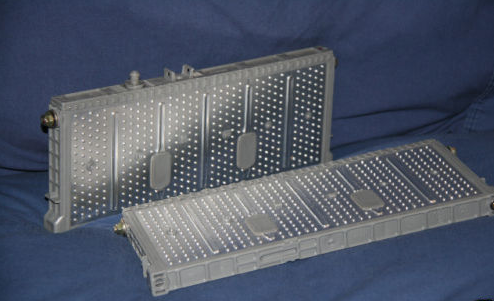
After Run #4, I was in a rush and so I put the charger on and went to a talk and then came back. About 3 hours had passed and the charger had over charged the batteries. It actually wedged the battery holder apart. So I'm worried now that my batteries will be weakened -- even though most of the bulging has subsided.

I reinforced the battery holder this morning and we'll see how it holds up.

Find recent content on the main index or look in the archives to find all content.

Recent Assets

  • av-pinouts.jpg